6 Criteria for Evaluating Any HR AI Tool
- 01 Sep 2026
- 7 mins

I ran a workshop recently where I built a working HR AI chatbot in about 20 minutes, live, in front of a group of HR people. None of them had ever built an AI tool before.
Before I started building, I put a list on the screen: the 6 things any HR AI tool has to get right before you put it in front of your employees. That list drew more questions than the app I built.
Ambition and excitement to build an AI tool do not, on their own, result in operational improvements to your people function.
MIT's NANDA initiative reviewed more than 300 publicly disclosed enterprise AI initiatives and found that 95% of pilots delivered no measurable impact on the P&L. Roughly 80% of organizations explore AI tools, 20% launch a pilot, and 5% reach production with measurable value. The study has had fair criticism for defining success narrowly, but I'd still take the direction of it seriously, because the researchers put the failures down to integration and workflow rather than model quality. That matches what I see when working with clients. The gap is between building something and building something people use.
So before you buy a tool or build one, here's what you should check.
The 6 criteria for HR AI tools
- Secure and built with tools you can trust. Your policy content, and anything downstream of it, shouldn't end up sitting with any vendor who impresses you with cool AI functionality. HR deals with a lot of sensitive and private information, so information security is critical. Make sure that any tool you built, or any vendor you work with, passes your organization’s information security standards.
- Lives in your existing tech stack. If using an HR AI tool means learning and opening a new app, most people won't do it. The tool has to show up where the work already happens.
- Answers from reliable sources. The output has to come from your company’s knowledge base, and it has to reference which document and section it came from. Without a citation, an employee has to either trust the answer blindly, or go looking for the policy themselves, which defeats the purpose.
- Auditable. You need a record of every question asked and every answer given, so you can check whether your AI tool is working as expected. Without it, you'll never know that someone got a wrong answer until it becomes a problem. Early on, I'll often put a human in the loop to approve every piece of output before it’s passed on to the next stage or reaches employees. Then, I reduce the cadence and limit it to critical tasks once the audit log shows that the AI tool is providing reliable output.
- Cost effective. Pay attention to how the tool charges you. Per-seat pricing makes your bill grow with headcount, which is a poor fit for something most employees will use infrequently. You should also be able to monitor costs and have control over them. The last thing you want to do is rack up an astronomical bill that doesn't make sense for the task at hand.
- Minimal overhead. If keeping the tool running becomes someone's side job, then you've swapped one kind of busy work for another. Changing a policy or updating a knowledge base shouldn't require re-uploading files or reconfiguring anything.
Any steps in your workflow that involve employee personally identifiable information (PII) should never get offloaded to AI, and neither should decisions that require human judgement. The HR AI chatbot I describe below stays on the right side of that line because it only ever reads your policy documents and the question someone typed. It never touches employee records.
Real-world impact of applying these criteria
I worked with an 80-person SaaS company serving customers in a heavily regulated industry. GDPR, SOC 2, HITRUST, and ISO 27001 are all required, so their information security standards are strict and their infosec team was known for blocking new software unless the business need was overwhelming, the finances made sense, and the tool didn't duplicate something they already owned.
The whole people function was made up of one People Ops Leader and one recruiter, supporting a distributed workforce in 28 US states and 7 other countries. Every employee question about HR policies meant the People team had to check their own policies for the right state or country before answering.
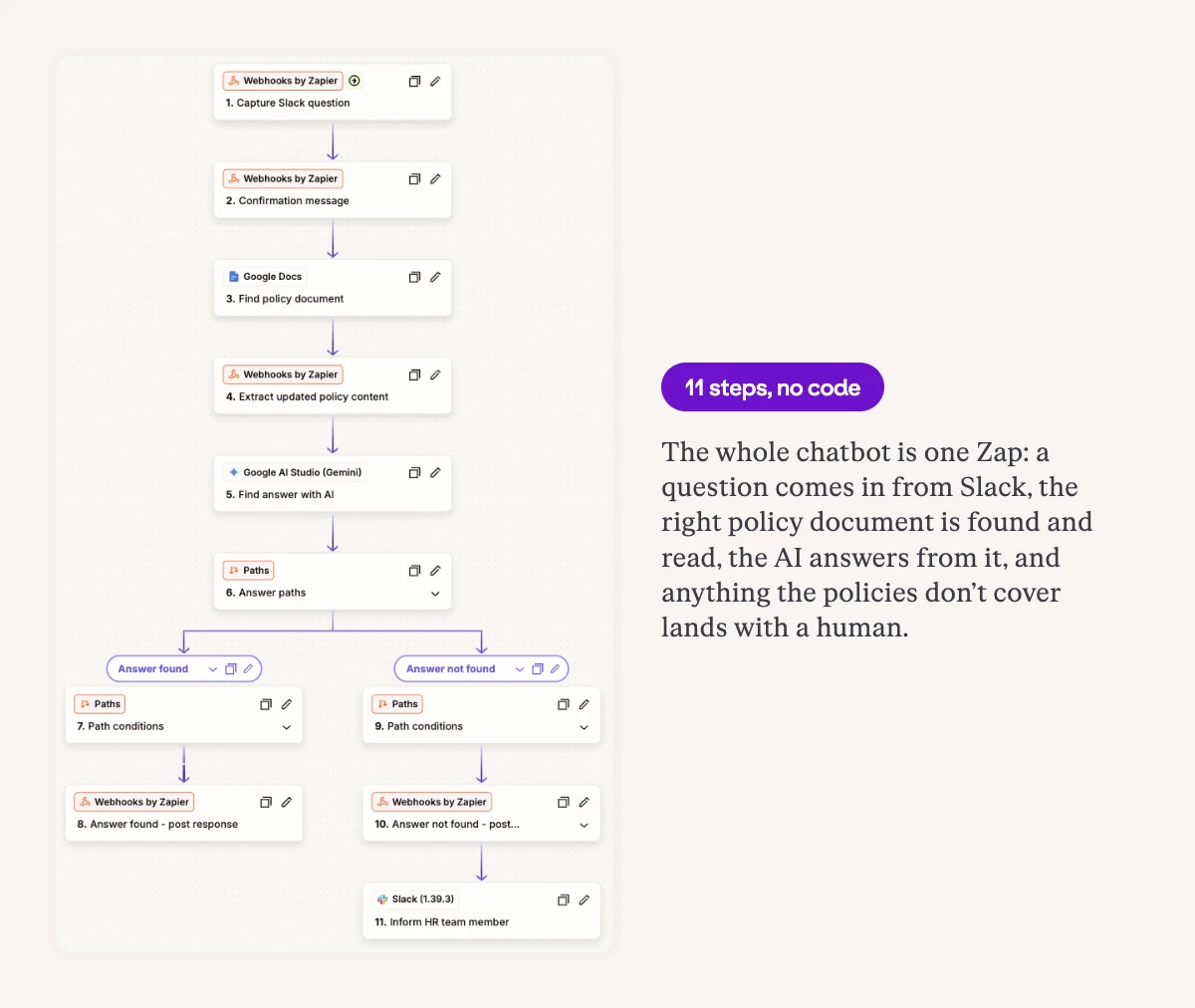
I built them an HR AI chatbot inside tools they already had: Slack for the chatbot and Google Docs for the HR policies. The only new spend I recommended was a $20 per month Zapier subscription to orchestrate it.
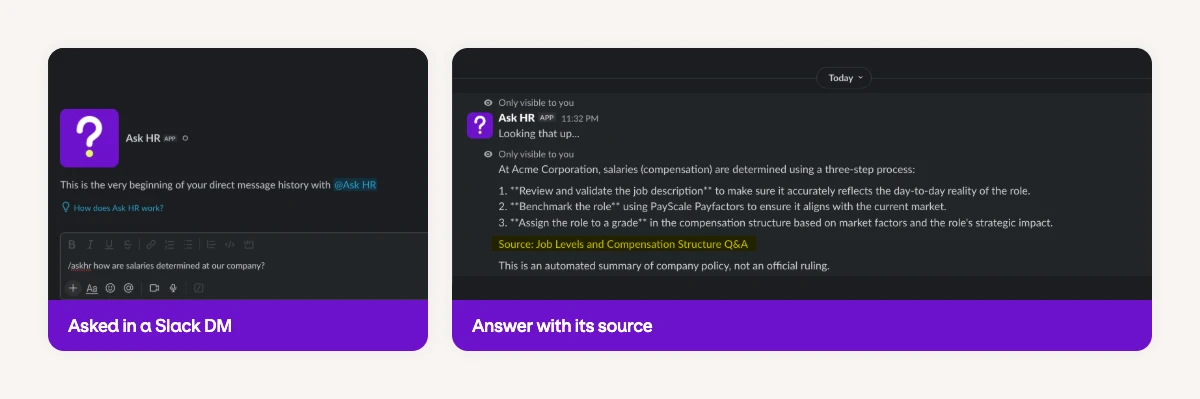
It cleared their acceptance process in 72 hours. In my experience that is remarkably fast for a company with that certification load, but it happened because there was almost nothing new to approve.
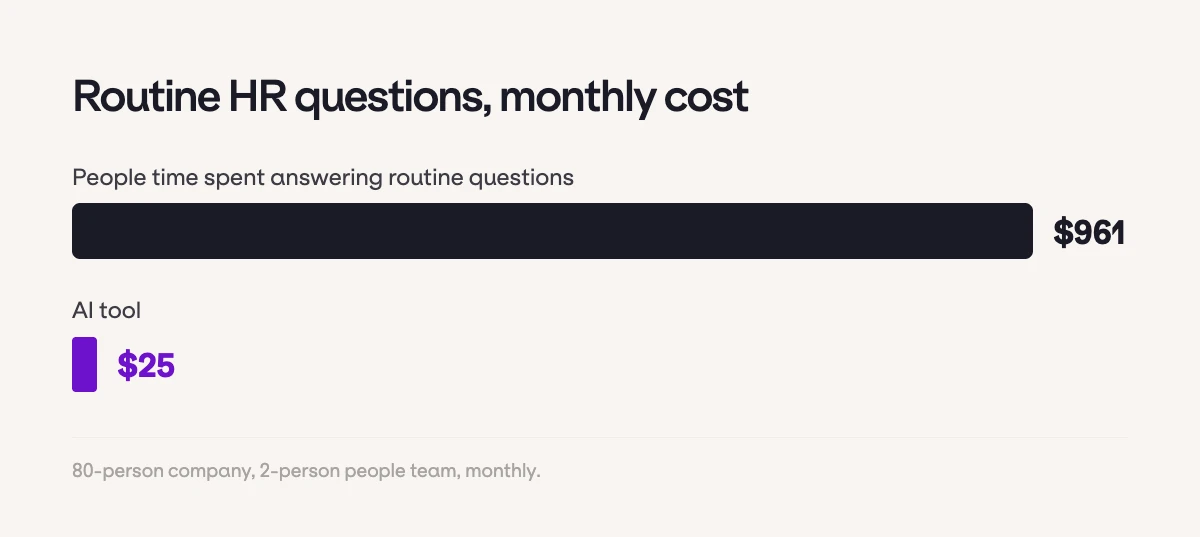
Here's the costing calculation I put in front of them. Each member of the People team was getting 8 to 10 questions a week that were consuming about 2 hours of each person's time. At a $160,000 gross salary over 2,080 hours, the People Ops Leader's share came to $615 a month. The recruiter, at $90,000, came to $346 a month. In total, this company was spending $961 a month of their people team's time to answer routine HR questions that were already documented.
The tool I built them costs $25 a month.
Within 90 days, they went from 8 to 10 questions each per week down to 0 to 2, and the ones left over were the questions their policies genuinely didn't cover.
This company was growing 20% to 25% a year and needed people programs built across several international markets. Those hour savings were redeployed to those strategic programs.
2 things about how HR AI tools work
Building HR AI tools for customers have taught me two things about how these tools work under the hood. They matter whether you build your own or prefer to buy a tool from a vendor.
Nothing is stored, and nothing is trained. A well-built HR AI tool accesses your documents and reads them at the moment someone asks a question, then forgets it. It never keeps a copy of your handbook and it never trains on the contents. If you change a policy at 9:00 am then an answer at 9:01 am reflects it, with nothing to re-upload and no need to retrain the tool. Ask any vendor where your handbook physically lives after you hand it over, and whether an answer can ever go stale. I see a lot of HRIS vendors doing this. They ask you to upload your documents into their software, but if you make any edits and forget to update the version in the HRIS, your AI tools stop functioning as expected.
It’s all about how you structure your prompts. What stops an AI tool from inventing answers and facts comes down to explicitly telling it to use only the documents you point it to. If your instructions are weak, or if a document isn’t accessible by the model, an AI tool will answer from everything it knows about HR in general, and sounds very convincing in the process. You cannot catch this by reading the answers, unless you know your policies inside and out, which becomes challenging if you have people in many locations.
The Stanford RegLab study on legal research tools makes the point better than I can. Purpose-built, domain-specific AI tools from LexisNexis and Thomson Reuters, marketed on the strength of their grounding architecture, still produced incorrect or ungrounded answers between 17% and 33% of the time. General-purpose GPT-4 on the same queries came in at 43%. Those results are from May 2024 product versions and the AI models have made significant improvements since, but the lesson still holds. If you use AI tools in any capacity, I’m sure you’ve seen this in action. AI tools will frequently make up answers or cite references that do not exist.
One of the easiest ways to test an AI tool is to ask it something your knowledge base could not possibly contain. If it answers confidently, then you need to reconfigure it. If this happens with a vendor’s tool, then you should walk away.
You cannot build on bad source material
The company above had unusually good source material. Certification against SOC 2 and ISO 27001 means their policies were written, current, and reviewed. Most companies I meet are nowhere near that. The handbook is a Notion page somebody half-wrote 18 months ago, and some policies contradict each other.
If that's you, the choice is straightforward. Keep paying an unreasonable amount of money doing things the way you've been doing them, or invest a small amount of time getting your source documents current enough to build on. AI tools need correct information and context to function properly. These are table stakes if you ever want to leverage AI and get real results in your company.
The material can live in Notion, Confluence, SharePoint, Google Docs, or anywhere else you keep documents. It just has to be accurate and structured.
Structure counts as much as accuracy here. The reason my HR AI chatbot could name each section an answer came from is that the client’s policy document used real heading styles and clear sections. Text that's been bolded to look like a heading makes it harder for the tool to detect as a separate section or topic, so if your handbook is one long stretch of formatting by eye, some tools won’t cite it properly.
Building on bad source material in HR creates confusion and generates admin overhead your team has to intercept anyway, which puts you right back to answering everything manually. Employees stop trusting the tool and stop using it. And depending on what the tool gets wrong, you can create compliance exposure you didn't have before.
Where to start this week
Before you explore HR AI tools, try to build some yourself, or book a vendor demo, do this:
- Audit your work and identify the things you do on a recurring basis.
- From that list, mark the ones that rely on structured or predictable inputs. Answering a question from a written policy qualifies. Deciding whether someone is ready for promotion does not.
- Choose the one you'd like to solve first.
- Write down the steps of the process and which tools you use for each one. Specify the inputs needed to get the work done. Are they available? If not, what has to happen to make them available?
- Specify which steps can be offloaded to AI. Remember, do not offload steps involving employee PII or decisions requiring human judgement.
- Open your LLM of choice (ChatGPT, Claude, Gemini, etc.), feed it everything you gathered, and ask how you'd build a process that automates or passes work to AI using your existing tools. If that isn't possible, ask what you'd need. Ask for specific instructions. You'll be surprised how detailed the answer is.
- Build it. Start experimenting and get to a prototype.
You can complete steps 1 through 5 in an afternoon. Step 6 is the one most people never think to do, and it's the easiest way to get started, even if you have zero technical proficiency in these things.
That was the thing I got wrong myself when I first started experimenting with AI three years ago. I used to think building tools like that HR AI chatbot took enormous technical expertise, and I've always been a technical person.
It gets easier as you go, and today's AI tools are increasingly built so that non-technical people can use them (e.g., ChatGPT Work, Claude Cowork, and Perplexity Computer). Experiment and you'll learn how to build more securely, more efficiently, and more cheaply than you'd imagine.
If you want step-by-step instructions for how to build the HR AI chatbot from my recent workshop, you can download the full guide below.