

A Startup Headcount Planning Template for Founders and HR
- 24 Nov 2026
- 10 mins

If you get your headcount plan wrong, you commit to paying salaries against revenue targets you don't hit, and then you have to fix it with layoffs. Most startups set themselves up for this because they plan backwards. A senior leader says "we need more marketing," they copy a generic job description online, and 6 months later nobody can explain what that new hire was actually supposed to change.
That is an expensive mistake, because payroll accounts for 50% to 80% of total costs at a knowledge-work startup. When you plan your headcount, you are planning most of your company's spending, so treat it with the exact same rigor your finance team would.
This week, I’ll cover step-by-step how I build a headcount plan. I have also included a startup headcount planning template, so you can apply this exact methodology using your own numbers: Download the Google Sheets template.
Start With the Goal and Give Each Team One Clear Number
When a hiring plan goes wrong, the reason usually comes back to the very start: company goals were unclear, or nobody broke them down into targets owned by a specific team. If your starting point isn't clear, your hiring plan won't be either.
So start with what your company wants to achieve over the next 6 to 18 months. Planning for less than 6 months leaves you scrambling, since finding and training a new employee takes months. Planning beyond 18 months is just guessing in this day and age.
Let’s use one main example for the rest of this newsletter. Imagine a software startup that brings in $3M per year in recurring subscriptions and wants to grow to $5M by the end of the year. To reach that goal, 3 different teams need to achieve these targets:
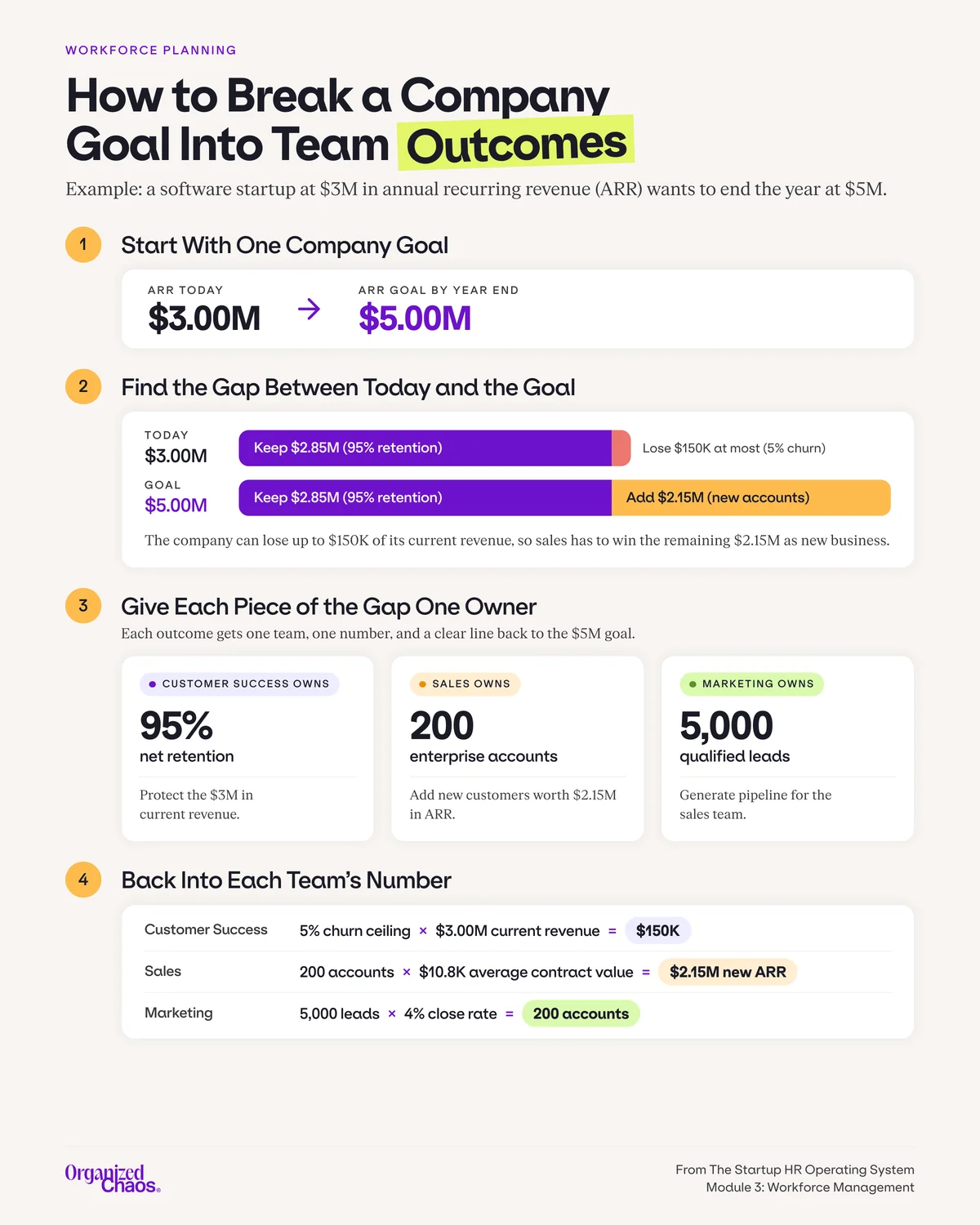
You’ll notice that each outcome is owned by a single team, and that’s by design because accountability gets lost when there are multiple owners. Each outcome also has a single metric, so there's no debate later about whether the team delivered on the goal.
Next, do the "sum test," which most teams forget. Ask your leaders: if every team hits its key metric, will we reach the total goal? Here, $2.85M plus $2.16M equals just over $5M, so the targets add up. If the numbers don't add up, adjust the targets before planning any new hires. Otherwise, you risk wasting company resources.
Make Every Role Prove Why It Should Exist
Every role on the plan needs a clear “why”. Before you open a job, answer one question: which business outcome will this role be responsible for driving?
Hiring a new person is only one way to solve a problem, and it is usually the slowest and most expensive option. So before you add a role, check if fixing a broken process can remove the extra work, if the work can be stopped entirely, or if a software tool can do it instead. If none of those options work, then you truly need to hire, and you can easily justify the role to your CEO by explaining the alternatives you already ruled out.
After defining why a role is needed, calculate the required headcount. First, figure out how many total people are needed to reach the goal. Next, subtract the number of people already doing that work today (shown in the Team Today column of the table above). The remaining number tells you how many new hires to make.
Sales is a simple example. We need 200 new accounts, and our historical data shows that 1 Account Executive can close about 50 accounts per year. Doing basic math shows we need 4 Account Executives in total. Since we already have 2, we need to hire 2 more.
Marketing does not have a single clear metric like sales, so list out all the tasks needed to hit those 5,000 leads before naming any specific roles. Paid acquisition takes about 80% of a full-time job (0.8), search engine optimization (SEO) and content take 60% (0.6), and marketing operations takes 30% (0.3). That adds up to 1.7 jobs across 3 different skill sets. If you try to hire 1 generalist to do everything, paid acquisition usually suffers first because it requires daily management. Therefore, it makes sense to hire 1 full-time Paid Acquisition Specialist and outsource the SEO and marketing operations work to a contractor.
Customer Success currently has no dedicated Customer Success Manager, so we should hire 1 to protect the $3M in existing revenue.
That leaves us with 5 total hires: 4 full-time employees and 1 contractor. My personal rule here is "no goal, no hire." Having created and reviewed many headcount plans, I find that CEOs rarely reject a plan when every proposed salary connects directly back to an approved company goal.
Test the Ratios Your Plan Depends On
Your whole hiring plan relies on key numbers (or ratios), such as "1 Account Executive closes 50 accounts a year." If you have your own historical data, use it. However, most early-stage startups do not have enough historical data they can rely on, so they plan using an educated guess or a figure taken from an industry benchmark report. Before you make any hiring decisions based on a number like that, follow these 4 simple steps:
- Do the step-by-step math: Calculate your expected results by multiplying smaller, verifiable daily or weekly activities. For example, start with the number of calls made per week, calculate how many of those calls turn into meetings, and then see how many meetings become signed deals. Multiply those steps out to find your total deals per year.
- Reduce benchmark figures: Look up industry standards from peer founders, investors, or published reports, and then lower that figure by 20% to 30%. Published benchmarks tend to highlight high-performing companies or exceptionally good quarters, so lowering them gives you a realistic target.
- Compare both results: If the calculated number from your step-by-step math is within 15% of the reduced benchmark figure, you can safely use your number. If the gap between the two numbers is larger than 25%, double-check your math. Whenever your own estimate is higher than the benchmark, stick with the lower figure until your real business data proves you can reach the higher number.
- Run a 90-day pilot: Track the output of an existing employee who is already performing this work. If no one is currently doing the job, hire just 1 person, even if your full plan calls for more, and track what they achieve from day 31 to day 90. Committing to hiring 4 Account Executives based on math without proven historical data is a risky and costly decision, so test your assumptions with 1 hire before approving the remaining positions.
Keep in mind that even after completing these steps, every ratio is still an assumption. Review your numbers every quarter and update your hiring plan whenever those ratios change.
Create 3 Headcount Plans and Agree on What Triggers Each One
At a startup, a single annual hiring plan quickly becomes outdated when your situation changes, such as closing a funding round early or missing a quarterly target. Because of this unpredictability, you should map out 3 separate plans before hiring anyone.
The baseline plan is the standard one we just created. The upside plan addresses what happens if you exceed your targets, specifying which roles to add or hire sooner. The downside plan addresses what happens if revenue growth slows, detailing which roles to cancel or postpone and in what order. Many teams agree to this strategy in principle but end up creating rushed upside and downside options without real thought, so make sure to give all 3 options the same level of care and detail.
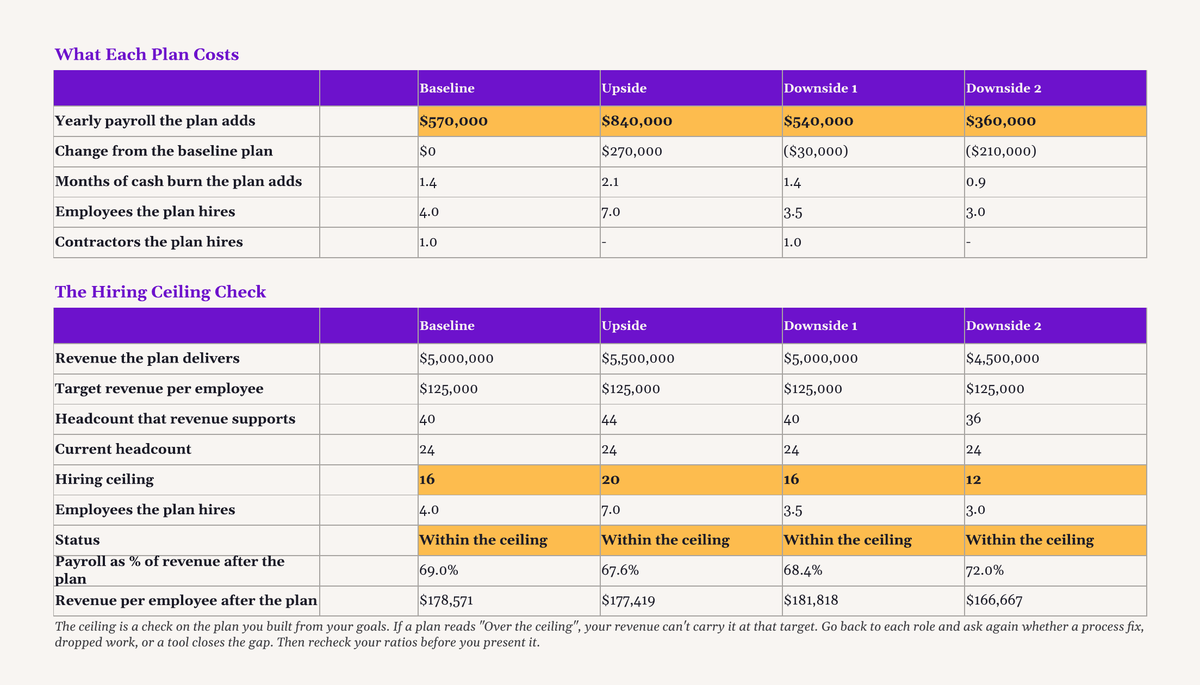
For this example, assume each full-time employee costs $120,000 per year including benefits and taxes, while the contractor costs $90,000:
Because each Account Executive handles about 50 accounts worth $10,800 each, adding or subtracting 1 Account Executive changes expected yearly revenue by around $540,000. This is why the upside plan targets about $5.5M in total revenue. On the other hand, the downside plan leaves you with 3 Account Executives, intentionally choosing to end the year closer to $4.5M to protect cash reserves.
A trigger is the specific condition that prompts you to switch from one plan to another. In other words, your plans are useless without them. Define every trigger using a concrete number so there is no ambiguity when interpreting the data.
Select metrics you can actively respond to. Ask yourself: if this metric changes, can we still take action within the current quarter? Metrics like revenue performance against targets or customer churn pass this test. If a metric only confirms an outcome after the fact (i.e., a lagging indicator) without giving you time to respond, then choose a leading indicator instead.
Finally, agree on the appropriate actions in advance and assign 1 person to authorize any plan changes (typically the CEO). When ownership over triggers is unclear, decision-making stalls and costs the business money.
Deciding these steps in advance accounts for how people react during high-pressure situations. When performance exceeds goals, excitement can lead leaders to over-hire, which is how startups end up needing layoffs. When growth slows down, stress often causes teams to either freeze all hiring out of panic or delay taking necessary corrective steps.
Compare Your Headcount Plan to Your Hiring Ceiling
Before presenting your plan to leadership, compare it to your hiring limit. This limit is the maximum number of new employees your targeted revenue can actually afford to pay for:
Hiring ceiling = (revenue target ÷ target revenue per employee) - current headcount
Set your target revenue per employee equal to or higher than what each employee produces today. For example, suppose our company currently has 24 employees and brings in $3M in revenue. That means each employee produces $125,000 per year. If we keep that same standard, a target revenue of $5M supports 40 total employees. Subtracting our current 24 employees leaves a hiring limit of 16 new positions.
Our baseline plan adds 4 new employees, which is well within our limit of 16. The upside plan adds 7 new employees, but because it aims for a higher target of $5.5M, its hiring limit increases to 20, so it fits as well. Contractors are left out of this formula because it only measures full-time employees.
This limit only checks whether your projected revenue can cover the payroll, so run this step last after proving why every role is necessary. If your proposed plan goes over the hiring limit, review each role again to see if a process improvement, dropped workload, or software tool can close the gap. Then verify your ratios one more time before presenting the plan.
If you need an external industry benchmark for comparison, the average private software-as-a-service (SaaS) business generates $141,125 in revenue per employee.
What to Do This Week
Open the Headcount Planning Template, navigate to the Goal tab, and type in your main company goal for the next 6 to 18 months along with 1 target for each team. Next, share the results of the sum test with your leadership team. If everyone agrees the numbers match your main goal, move on to the Ratios tab.
This newsletter edition covers the main ideas from the Workforce Management module of my course, The Startup HR Operating System. The full module also explains how to design individual roles, manage hiring requests that fall outside your approved plan, and navigate hiring during a business downturn.
FAQ
- What is a hiring ceiling? It's the number of new employees your planned revenue can support: (revenue target ÷ target revenue per employee) minus current headcount.
- How far ahead should a startup plan headcount? Plan 6 to 18 months ahead. Under 6 months you're reacting, and over 18 months you're guessing.
- How do you work out how many people to hire? Take the people each team outcome needs and subtract the people you already have. The gap is your hiring plan.
- How do you plan headcount with no historical data? Do the bottom-up math, compare it with a benchmark cut by 20%-30%, then confirm the number with a 90-day pilot.
- What is a headcount plan trigger? It's a number agreed in advance that switches you from one plan to another, with 1 person named to approve the switch.